 PillowBook
What’s New
New features and fixes in each version of PillowBook.
1.1
October 27, 2026Highlights
Underlines and Notes
Underline a line you love, or write a note and add a picture; everything is gathered in the Notebook, where you can also turn notes into an image to share with friends.
Translate a Selection
Select a passage in another language and tap Translate, and your iPhone translates it into your language right on the device, with no account needed.
Home Screen Widgets
Put the books you’re reading and how long you’ve read today on your Home Screen, and tap to go straight back into a book.
Custom Covers
Make a book’s cover from your own photo, and decide where the title goes, how big it is and how it’s aligned.
Made for iPhone Duo
Held sideways, the inner display fills the screen with two pages side by side, like an open book; the library, menus and cards are all laid out afresh for the inner display. On the outer display, the Me page fills the screen too, with its buttons below the camera.
Me
A new Me page at the top of Settings — your own page in PillowBook. Set your own name and avatar, earn trophies as your reading level rises and show one beside your name, see this week’s Reading Log, and choose between two themes, Reef and Aurora.
New
- Me page: Me, at the top of Settings, is your own page in PillowBook: your name, your avatar, your reading level and trophies, and this week’s Reading Log.
- Name and avatar: Change your name any time; for your avatar, pick one of three origami pictures or use your own photo.
- Two themes: Reef and Aurora. The header is a moving picture that turns to night in Dark Mode; swipe across it to switch themes, and the trophies switch to that theme’s set.

Reef 
Aurora - Reading level and trophies: Your reading time adds up day by day (up to 60 minutes a day), through 36 levels. Each theme has a set of eight trophies, one earned at each of Lv 1, 5, 10, 15, 20, 25, 30 and 36; pick any trophy you have earned to show beside your name with your level — it goes on your Reading Poster too.Reef
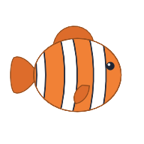
Clownfish
Lv 1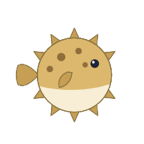
Pufferfish
Lv 5
Jellyfish
Lv 10
Sea Turtle
Lv 15
Dolphin
Lv 20
Manta
Lv 25
Shark
Lv 30
Whale
Lv 36Aurora
Firefly
Lv 1
Maple Leaf
Lv 5
Snowflake
Lv 10
Snowy Pine
Lv 15
Snow Peak
Lv 20
Moon
Lv 25
Saturn
Lv 30
Milky Way
Lv 36 - Invite Friends: Send a friend your invite link, and their library gets room for 10 more books once they accept; when they send back their receipt code, yours grows too (+10, +5 and +5 books for your first three friends).
- Reading Poster: Turn your reading level, trophy, reading time and this week’s Reading Log into a poster to share with friends.
- Custom Covers: Make a book’s cover from your own photo: press and hold a book in the library → “Change Cover”, tap “+” in the “Custom” tile and choose a photo; after cropping, drag the title and adjust its size and alignment.
- Cover Sharing: Turn the finished cover into an image — the cover, its title and the date — to share with friends.
- Custom Reading Background: Reading themes gain “Custom Theme Colour” — pick any colour from the wheel as the page background, and the text switches to dark or light to suit it; the wheel only offers colours that keep the text easy to read.
- Redetect EPUB Chapters: EPUBs with contents that are too coarse can have their chapters redetected from headings, and you can switch back to the book’s own contents at any time.
- Waiting for Audio: The progress bar shows how much audio is ready, and if you drag past it, playback waits until the audio is generated and starts from there.
- New Library Storage: Each book’s original file, its progress and notes, and the data used to lay it out are now kept apart, so problems are easier to repair; PillowBook also starts recording, on this device only, when you read and listen, ready for reading statistics to come. The first time you open the app after updating, it reorganizes your library once — with many books this takes a moment, showing “Organizing Library” with progress; please stay in PillowBook. If it is interrupted, it picks up again the next time you open the app.
- Original Files Kept: A copy of the original file is kept on import, so a book can be repaired automatically if its reading files are damaged.
- Library Check: Check your whole library in Settings to find and deal with incomplete books.
- Back to Top: When you scroll far down the library, a button appears in the bottom-right corner to take you back to the top.
- Your Avatar on iPhone Duo: When iPhone Duo shows the status bar down the side (on the outer display, or the inner display held sideways), your avatar sits at the foot of that column; tap it to go straight to Me.
Improvements
- Read Aloud Keeps Up: In page-turning modes, if you turn to another chapter, read-aloud brings the page back to where it’s reading.
- Smoother Start to Listening: Speech processing now happens entirely in the background, so the interface no longer stalls when you tap Listen.
- New Voices Right Away: Voices you download or delete in iOS Settings appear as soon as you return to PillowBook, without reopening the app.
- Progress for Long Chapters: Opening a very long chapter shows “Laying out” with its progress, instead of leaving the previous chapter on screen; a page turn tapped meanwhile is kept and made once the chapter is ready.
- Better Chapter Detection: Chapter headings that are just a number, such as “1.” or “三、”, are now recognised.
- Faster In-Book Search: Searching a chapter with many matches is noticeably faster.
- Wide-Screen Layout: On iPad in landscape and on the inner display of iPhone Duo, Recently Read on the left of the library shows two columns of large covers, and menus and cards fit the window size.
- Consistent Design: Buttons, cards and pop-ups share the same rounded corners and margins, and match the new system look on iOS 18 as well.
- Bigger Pop-ups on iPad: On iPad, Settings, Contents, Book Info and other pop-ups are wider and taller, close to the full screen, instead of a small box in the middle.
- Pop-ups Sized to Their Content: Wi-Fi Transfer, the share poster, and the Voice and Get Voices panels in Listen are as tall as what is in them, without large blank areas.
- EPUB Titles: EPUBs keep the title written in the book; the file name is used only when the title is empty or a placeholder such as “Unknown” or “Untitled”.
- Selecting Across Pages: In Scroll mode and in the two-page view on iPad in landscape, a long-press selection can be dragged across the seam between pages.
- EPUB Illustration Sizes: Illustrations appear at the size the book specifies, so small icons and avatars no longer fill a whole line, and icons inside a sentence stay in the text. Books already imported need to be imported again.
- Steady Interface Layout: Interface text no longer follows the system’s Larger Text setting, so layouts always stay tidy; you can still choose any text size on the reading page.
- Vault Prompts: Prompts now mention Face ID, Touch ID or your passcode, depending on the device.
Fixes
- Fixed the app crashing when starting read-aloud on iOS 18.
- Fixed the highlighted sentence not matching the sentence being read aloud in EPUBs.
- Fixed progress getting stuck, with audio and highlighting out of step, after dragging the listening progress bar to the end.
- Fixed the mini player’s buttons being hard to hit and easily turning the page by mistake.
- Fixed highlighting and page-following going wrong when chapters were redetected during read-aloud (read-aloud now stops and lets you know).
- Fixed the whole screen going blank after switching between Warm and Cool.
- Fixed open pop-ups not changing along with the system when it switched between dark and light mode.
- Fixed some books showing light text on a light background or black text on a dark one, and stuttering, when the paper colour switched between light and dark.
- Fixed very long chapters not scrolling in Scroll mode.
- Fixed large blank areas, and occasional crashes, after a fast swipe while scrolling vertical text.
- Fixed long-press selecting only a single word, and selections not being draggable, in Scroll mode.
- Fixed text briefly turning blurry during Page Curl.
- Fixed the text being shifted out of place during Page Curl on iOS 18.
- Fixed chat bubbles and bordered paragraphs being cut off at the bottom of the page.
- Fixed chat bubbles that span two pages being split at the seam between pages in Scroll mode.
- Fixed long-press text selection occasionally freezing for a few seconds.
- Fixed reading progress and bookmarks moving to the wrong place after redetecting chapters in a txt book.
- Fixed in-book search sometimes staying stuck on “Searching…”.
- Fixed importing several books at once past the Library limit sometimes showing no message, with the extra books silently left out.
- Fixed the yellow mark from a bookmark or search jump appearing in an unrelated place after turning back into a very short previous chapter.
- Fixed a crash when opening Contents with VoiceOver turned on in iOS 27.
- Fixed memory use growing after reading several books in a row.
- Fixed covers in Reading Stats not matching the ones in the library.
1.0
September 2026 · First releaseLibrary
- Importing Books: txt and EPUB are supported, imported from Files, shared from another app, or sent from a computer with Wi-Fi Transfer.
- Chapter Detection: Chapters and volumes are detected automatically, a txt with no chapter marks still gets chapters, and you can redetect with a different pattern if the result isn’t right.
- Favourites, Archive and Vault: Long-press a book to favourite or archive it, or move it to the Vault, opened with Face ID or your passcode.
- Automatic Covers: Books without a cover get a hand-drawn background picked by title, in one of three cover styles: Flat, 3D or Stamp.
- Full-Text Search: Search titles, authors and the text inside books.
- Reading Activity: Pull down on the library to see how long you read each day, your streak and how you’re doing against your daily goal.
Reading
- Three Ways to Turn Pages: Choose Page Turn, Scroll or Page Curl, with Auto Page Turn as well.
- Vertical Reading: Any book can be set to vertical text on its own, with page turning, scrolling, bookmarks and read-aloud all supported.
- Fonts and Layout: Source Han Serif, LXGW WenKai and Resource Han Rounded are built in, and size, margins, letter, line and paragraph spacing are all adjustable.
- Chinese and Japanese Details: Show ruby from EPUBs, show “ ” as 「 」, and get a suggestion to switch to vertical text for right-to-left books.
- EPUB and Manga: EPUB styles and illustrations are preserved, and image-based manga is shown one centred picture per page.
- Bookmarks and Progress: Kept as positions in the original text, so they stay in place when you change the text size or layout.
- Reading Themes: Several paper colours, or your own photo as the reading background.
- Two Pages on iPad: In landscape on iPad, two pages sit side by side, like an open book.
Read Aloud
- Offline Narration: Uses the system voices, works without a connection, and turns the page as it reads.
- Lock Screen and Dynamic Island: Keeps playing when your iPhone is locked, with controls on the Lock Screen and in the Dynamic Island.
- Narration Settings: Adjust the speed, set a stop timer, and choose the narration language and voice for each book.
Appearance and More
- Four Interface Languages: Simplified Chinese, Traditional Chinese, English and Japanese, switchable right in the app.
- Warm and Cool: Switch between two base tones with one tap, plus eight app icons and seven accent colours.
- No Account, No Ads, No Tracking: Your books are stored only on your device.
In-App Purchases
- Unlimited Library: The free version holds 5 books, and a single purchase removes the limit for good.
- Buy the Developer a Coffee: A tip that can be repeated and unlocks no features.
- Redeem Code: App Store offer codes are supported.